
Inline Monitor Settings | MyEyedro User Guide
To edit a the settings for an Inline Power Meter, navigate to the Devices Configuration plugin and choose the desired device from the list. A device type specific editor will open.
NOTE: Some settings and pages below, denoted by “(advanced)“, are only visible with the Show Advanced Settings options checked in the plugin options.
Sensor Settings
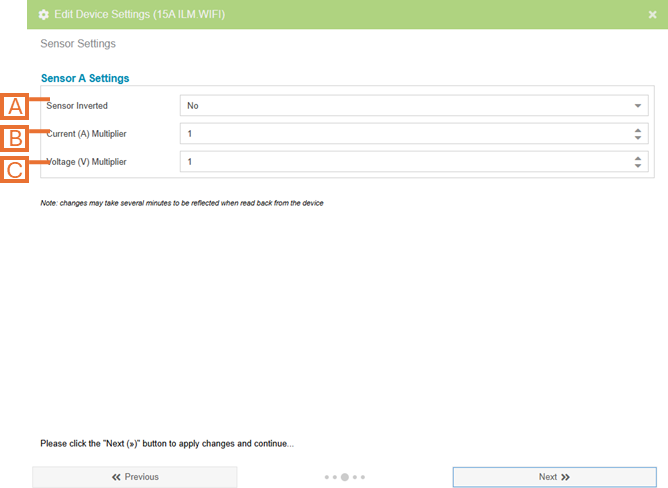
- Sensor Inverted. Flip the polarity of your sensors (i.e. negative readings will become positive readings and vice-versa).
- NOTE: This value should not be changed from the default value (No).
- Current (A) Multiplier (advanced). An additional multiplier to be applied to your current reading.
- IMPORTANT: This value will impact the readings from the hardware if chosen incorrectly.
- Voltage (V) Multiplier (advanced). An additional multiplier to be applied to your voltage reading.
- IMPORTANT: This value will impact the readings from the hardware if chosen incorrectly.
Advanced Settings
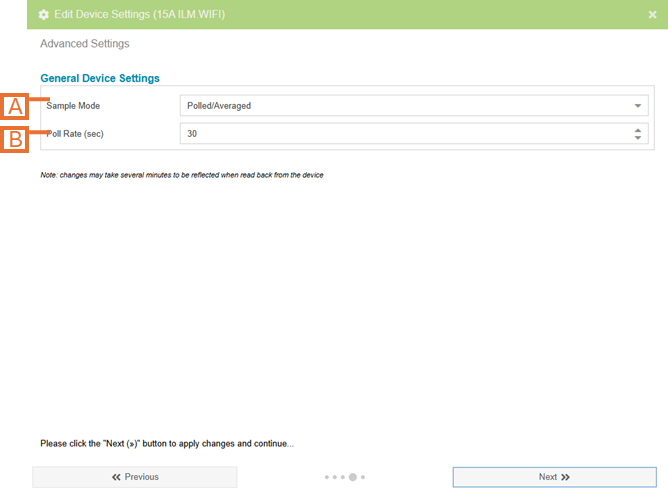
- Sample Mode (advanced). Change the method used to sample data.
- NOTE: The default sample mode is COS and should not be modified unless instructed to. If set incorrectly, this setting can have a significant impact on system bandwidth and responsiveness.
- Change of State (COS) only sends data when it detects a change in value.
- Polled mode sends readings at a fixed interval.
- NOTE: The default sample mode is COS and should not be modified unless instructed to. If set incorrectly, this setting can have a significant impact on system bandwidth and responsiveness.
- Sample Mode Options (advanced). Options are presented based on the Sample Mode selected.
- When Sample Mode is set to Change Of State, this specifies the minimum difference in wattage readings for a new data point to be recorded.
- When Sample Mode is set to Polled, this specifies the period in seconds at which data points will be captured.