Add Display Group
To add a display group, navigate to the Display Groups Configuration plugin. Click the ‘Add Display Group‘ button. This will open a form which is

To add a display group, navigate to the Display Groups Configuration plugin. Click the ‘Add Display Group‘ button. This will open a form which is
To edit a rate profile, navigate to the Rates Configuration plugin. Select the rate profile you’d like to edit from the list. Click the
As your utility adjusts its charges over time, the rate configuration plugin can be used to add new Rate Profiles to reflect the updated fee
Bill Profiles are representative of a specific utility service. They are associated with Display Groups and used to compute cost estimates and present billing information
Navigating MyEyedro is simple and intuitive. The below image highlights the key regions of the MyEyedro user interface and how to get around. Plugin Selection


Use the MyEyedro cloud software to track your energy savings and create rebate submission reports.
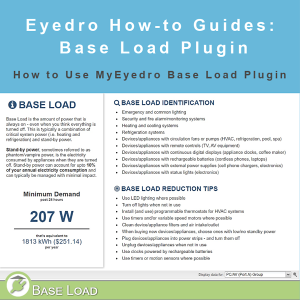

MyEydero How-to Guides: navigate the Base Load plugin, determine total standby and always-on critical systems power by Display Group.
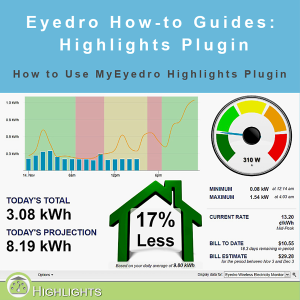
Eydero How-to Guides: navigate the Highlights Plugin, view daily usage, projected usage and more.

From a firefighter’s perspective, the Eyedro real-time electricity monitoring system is great for monitoring energy consumption but is also a tool that can be applied for fire prevention.
In May 2014, Eyedro had the privilege of attending the White House Energy Datapalooza event in Washington, DC. The annual forum gives hundreds of like-minded