MyEyedro Bills Plugin
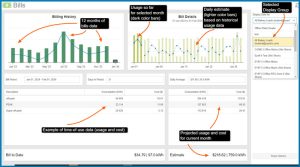
In the MyEyedro Bills plugin you can quickly check your current usage, see projected monthly and daily usage, match your billing period to your electric bill, view historical usage data & more!

In the MyEyedro Bills plugin you can quickly check your current usage, see projected monthly and daily usage, match your billing period to your electric bill, view historical usage data & more!

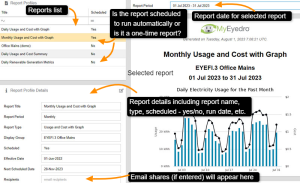
View your energy reports in MyEyedro with the Report Viewer plugin. Select your scheduled or unscheduled report from the list of reports you created, then select from a chronological list of historical reports.

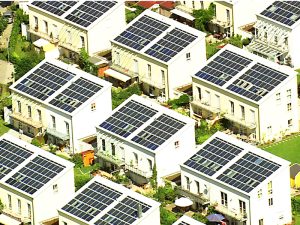
Eyedro solar and electricity monitoring systems help you understand how much money you are saving with your solar panels.

From within your MyEyedro account you can access cloud support for any page in MyEyedro . Simply clicking on the question mark icon that is visible on every page will take you to the corresponding section in the MyEyedro User Guide.

Overview of MyEyedro Reports Configuration including time interval, reports scheduling, email sharing, reports type, reports options based on MyEyedro license type and reports list and status.

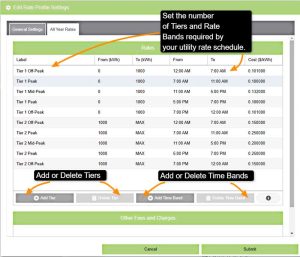
In Eyedro’s MyEyedro energy cloud you have the flexibility to match your Tiered Time-of-Use utility rates to your utility bill. Add multiple time bands and multiple tiers then view your data in the MyEyedro Bills plugin!

For Eyedro energy monitors that are directional sensing capable, you can easily invert the polarity of your Eyedro measurements right in the MyEyedro cloud software Device Settings. No need to physically flip the current sensors in your electrical panel!

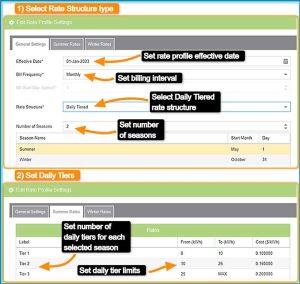
Set your Daily Tiered Rates in the MyEyedro cloud interface. With MyEyedro you can add the rate bands that correspond to your energy bill.

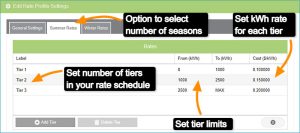
Set your tiered rates in the MyEyedro cloud interface. With MyEyedro you can add the rate bands that correspond to your electricity bill.

Hire an electrical contractor to ensure that your electrical work meets local electrical safety codes.