MyEyedro V5 Tools Overview

MyEyedro cloud software version 5 Tools menu overview

[et_pb_section fb_built=”1″ _builder_version=”4.17.1″ _module_preset=”default” custom_padding=”||7px|||” global_colors_info=”{}”][et_pb_row _builder_version=”4.17.1″ _module_preset=”default” custom_margin=”-13px|auto||auto||” custom_padding=”||25px|||” global_colors_info=”{}”][et_pb_column type=”4_4″ _builder_version=”4.17.1″ _module_preset=”default” global_colors_info=”{}”][et_pb_text _builder_version=”4.17.1″ _module_preset=”default” header_font=”|700|||||||” header_text_align=”center” header_font_size=”35px” custom_margin=”-30px||-17px|||” box_shadow_style=”preset3″ box_shadow_horizontal=”8px” box_shadow_blur=”17px” box_shadow_spread=”-7px” box_shadow_color=”#68b8da” global_colors_info=”{}”]

MyEyedro V5 Tools Overview

[/et_pb_text][/et_pb_column][/et_pb_row][et_pb_row column_structure=”1_2,1_2″ _builder_version=”4.17.1″ _module_preset=”default” custom_padding=”21px|||||” global_colors_info=”{}”][et_pb_column type=”1_2″ _builder_version=”4.17.1″ _module_preset=”default” global_colors_info=”{}”][et_pb_text _builder_version=”4.17.6″ _module_preset=”default” text_font=”|600|||||||” text_text_color=”#000000″ text_font_size=”20px” text_line_height=”1.3em” background_color=”#68b8da” width=”98.2%” module_alignment=”left” min_height=”387px” custom_margin=”26px|-80px|-8px|-4px|false|false” custom_padding=”10px|12px|10px|20px|false|false” box_shadow_style=”preset3″ box_shadow_color=”#68b8da” global_colors_info=”{}”]

Within the MyEyedro cloud software you will find a number of useful tools, including Excel Data Exporter, Base Load (always on power), Peak Load (useful for sizing generators and renewables), Unit Converter, Cost Estimator and Solar Calculator which allows you to determine solar system potential and ROI.

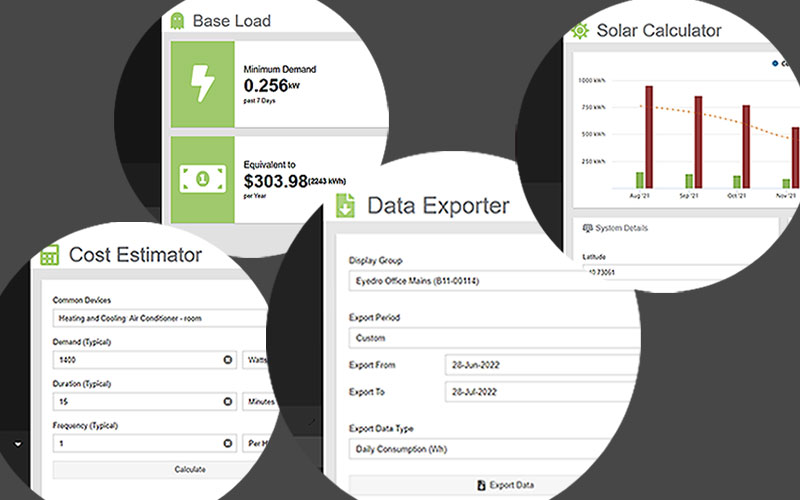
There are direct links from the MyEyedro cloud pages to the MyEyedro user guide for help on any of the Tools or menu items.

[/et_pb_text][/et_pb_column][et_pb_column type=”1_2″ _builder_version=”4.17.1″ _module_preset=”default” global_colors_info=”{}”][et_pb_text _builder_version=”4.17.6″ _module_preset=”default” text_font=”|600|||||||” text_text_color=”#ff8c00″ text_font_size=”22px” text_line_height=”2.3em” header_text_align=”center” header_line_height=”1.2em” header_3_font=”|600|||||||” header_3_font_size=”26px” background_enable_color=”off” width=”100%” module_alignment=”left” custom_margin=”-10px|99px||10px|false|false” custom_padding=”0px|22px||34px|false|false” animation_style=”slide” animation_delay=”400ms” animation_intensity_slide=”60%” global_colors_info=”{}”]

  • Export your data to Excel
  • Check your Base Load or “Ghost Power”
  • Determine your 7 day Peak Demand
    • Convert from one unit type to another
    • Calculate typical energy costs by appliance type

    [/et_pb_text][/et_pb_column][/et_pb_row][et_pb_row _builder_version=”4.17.1″ _module_preset=”default” min_height=”52px” custom_margin=”|auto|18px|auto||” custom_padding=”49px|||||” global_colors_info=”{}”][et_pb_column type=”4_4″ _builder_version=”4.17.1″ _module_preset=”default” global_colors_info=”{}”][et_pb_text _builder_version=”4.17.1″ _module_preset=”default” header_3_font=”|600|||||||” header_3_text_align=”center” header_3_text_color=”#008eb5″ header_3_font_size=”30px” min_height=”32px” custom_margin=”-60px||37px|||” custom_padding=”17px||||false|false” global_colors_info=”{}”]

    Energy Monitoring Made Easy

    [/et_pb_text][et_pb_video src=”https://youtu.be/A0KabZkHwQk” image_src=”//i.ytimg.com/vi/A0KabZkHwQk/hqdefault.jpg” admin_label=”MyEyedro Tools Video” _builder_version=”4.17.6″ _module_preset=”default” custom_margin=”-4px|||||” db_limit_youtube_related_videos_to_same_channel=”on” box_shadow_style=”preset3″ box_shadow_blur=”24px” box_shadow_color=”#68b8da” global_colors_info=”{}”][/et_pb_video][/et_pb_column][/et_pb_row][et_pb_row _builder_version=”4.22.2″ _module_preset=”default” global_colors_info=”{}”][et_pb_column type=”4_4″ _builder_version=”4.22.2″ _module_preset=”default” global_colors_info=”{}”][et_pb_text _builder_version=”4.22.2″ _module_preset=”default” text_font=”|600|||||||” text_font_size=”16px” global_colors_info=”{}”]

    Unlock advanced alerts, asset intelligence, asset profiles, advanced reports, RETScreen integration, and more with a MyEyedro Pro license.

    [/et_pb_text][/et_pb_column][/et_pb_row][et_pb_row _builder_version=”4.18.0″ _module_preset=”default” custom_padding=”6px|||||” global_colors_info=”{}”][et_pb_column type=”4_4″ _builder_version=”4.18.0″ _module_preset=”default” global_colors_info=”{}”][et_pb_text _builder_version=”4.18.0″ _module_preset=”default” text_font=”|600|||||||” text_font_size=”16px” background_color=”#e7e7e7″ custom_margin=”8px|||||” custom_padding=”3px||3px|4px|false|false” border_radii=”on|3px|3px|3px|3px” border_width_all=”4px” global_colors_info=”{}”]

    Suggested Next Topic:


    MyEyedro Configuration Overview

    [/et_pb_text][/et_pb_column][/et_pb_row][/et_pb_section][et_pb_section fb_built=”1″ _builder_version=”4.17.1″ _module_preset=”default” custom_padding=”0px|||||” global_colors_info=”{}”][et_pb_row _builder_version=”4.17.1″ _module_preset=”default” global_colors_info=”{}”][et_pb_column type=”4_4″ _builder_version=”4.17.1″ _module_preset=”default” global_colors_info=”{}”][et_pb_text _builder_version=”4.17.1″ _module_preset=”default” header_font=”|700|||||||” header_text_align=”center” header_font_size=”35px” header_2_font=”|700|||||||” header_2_font_size=”28px” custom_margin=”-12px||25px|||” box_shadow_style=”preset3″ box_shadow_horizontal=”8px” box_shadow_blur=”17px” box_shadow_spread=”-7px” box_shadow_color=”#68b8da” global_colors_info=”{}”]

    Eyedro User Manuals

    [/et_pb_text][et_pb_text admin_label=”Manuals & Tech Support Links” _builder_version=”4.22.0″ _module_preset=”default” text_font=”|600|||||||” text_font_size=”16px” min_height=”156px” custom_margin=”30px|||||” global_colors_info=”{}”]

    For detailed Eyedro product specifications, installation, and MyEyedro cloud software information please refer to the following Eyedro manuals:

    MyEyedro Cloud Software Manual

    Eyedro Home Products Guide

    Eyedro Business Products Guide

    Eyedro Technical Support

    [/et_pb_text][/et_pb_column][/et_pb_row][/et_pb_section]

    Share this Article: