Privacy Policy
Version: 2.1Posted: 31-Mar-2026 Preface Eyedro Green Solutions Inc. is committed to keeping personal information it collects accurate, confidential, secure and private. This Privacy Policy has been

Version: 2.1Posted: 31-Mar-2026 Preface Eyedro Green Solutions Inc. is committed to keeping personal information it collects accurate, confidential, secure and private. This Privacy Policy has been
Version: 2.1Posted: 9-Sep-2026 These Terms cover your use of Eyedro websites, MyEyedro cloud services, mobile applications, APIs, embedded software, and connected hardware devices. 1. Agreement to
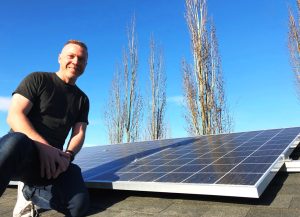

Testimonial on installing and using the Eyedro EYEFI-4 solar and energy monitor.
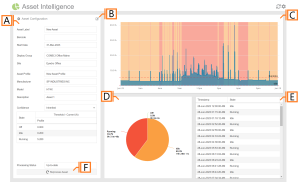

The MyEyedro Asset Intelligence plugin provides detailed run-state analysis for monitoring machinery and lab equipment. This plugin is intended to be used for analysis of
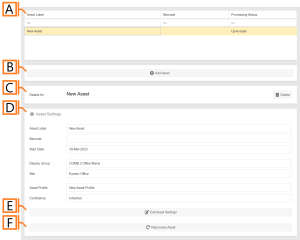
Assets are representative of a physical piece of equipment belonging to the specifications outlined in their corresponding Asset Profile.
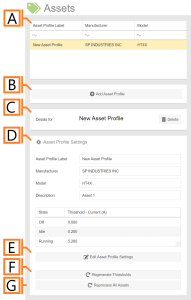
Asset Profiles are groupings of common assets (machines, equipment, appliances, etc.) from which baseline current draw can be established for each of the various run-states
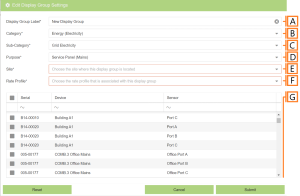
To add a display group, navigate to the Display Groups Configuration plugin. Click the ‘Add Display Group‘ button. This will open a form which is
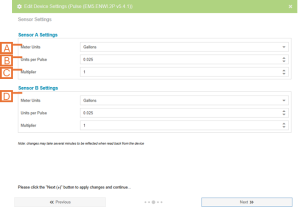
To edit a the settings for a Pulse Monitor, navigate to the Devices Configuration plugin and choose the desired device from the list. A device
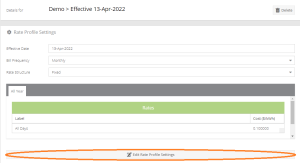
To edit a rate profile, navigate to the Rates Configuration plugin. IMPORTANT: You must have an rate profile spanning the time period of data from
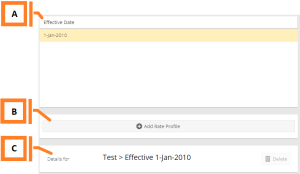
As your utility adjusts its charges over time, the rate configuration plugin can be used to add new Rate Profiles to reflect the updated fee