MyEyedro Display Group Configuration

MyEyedro V5 Display Group Configuration

[et_pb_section fb_built=”1″ _builder_version=”4.17.1″ _module_preset=”default” custom_padding=”||7px|||” global_colors_info=”{}”][et_pb_row _builder_version=”4.17.1″ _module_preset=”default” custom_margin=”-13px|auto||auto||” custom_padding=”||25px|||” hover_enabled=”0″ global_colors_info=”{}” sticky_enabled=”0″][et_pb_column type=”4_4″ _builder_version=”4.17.1″ _module_preset=”default” global_colors_info=”{}”][et_pb_text _builder_version=”4.22.2″ _module_preset=”default” header_font=”|700|||||||” header_text_align=”center” header_font_size=”35px” custom_margin=”-30px||-17px|||” hover_enabled=”0″ box_shadow_style=”preset3″ box_shadow_horizontal=”8px” box_shadow_blur=”17px” box_shadow_spread=”-7px” box_shadow_color=”#68b8da” global_colors_info=”{}” sticky_enabled=”0″]

MyEyedro Display Group Configuration

[/et_pb_text][/et_pb_column][/et_pb_row][et_pb_row column_structure=”1_2,1_2″ _builder_version=”4.17.1″ _module_preset=”default” custom_padding=”21px|||||” global_colors_info=”{}”][et_pb_column type=”1_2″ _builder_version=”4.17.1″ _module_preset=”default” global_colors_info=”{}”][et_pb_text _builder_version=”4.18.0″ _module_preset=”default” text_font=”|600|||||||” text_text_color=”#000000″ text_font_size=”20px” text_line_height=”1.3em” background_color=”#afd17f” width=”97%” module_alignment=”left” min_height=”387px” custom_margin=”16px|-80px|-8px|-4px|false|false” custom_padding=”27px|12px|0px|20px|false|false” box_shadow_style=”preset3″ box_shadow_color=”#68b8da” global_colors_info=”{}”]

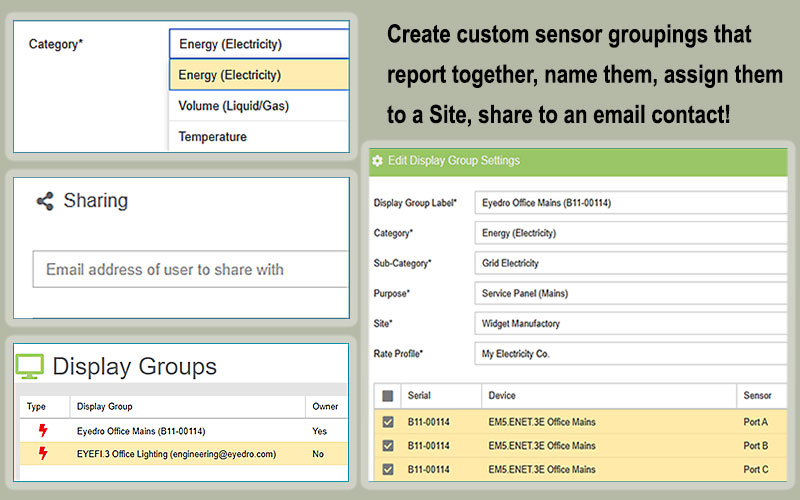
MyEyedro Display Group configuration settings allow you to create custom groupings of sensors that report together, assign personalized names to Display Groups, assign to a Site, create email shares.

There are direct links from the MyEyedro cloud pages to the MyEyedro user guide for help on any of the Configuration menu items.

[/et_pb_text][/et_pb_column][et_pb_column type=”1_2″ _builder_version=”4.17.1″ _module_preset=”default” global_colors_info=”{}”][et_pb_text _builder_version=”4.18.0″ _module_preset=”default” text_font=”|600|||||||” text_text_color=”#ff8c00″ text_font_size=”22px” text_line_height=”2.3em” header_text_align=”center” header_line_height=”1.2em” header_3_font=”|600|||||||” header_3_font_size=”26px” background_enable_color=”off” width=”100%” module_alignment=”left” custom_margin=”-8px|99px||6px|false|false” custom_padding=”0px|22px||34px||” animation_style=”slide” animation_delay=”400ms” animation_intensity_slide=”58%” global_colors_info=”{}”]

  • Create custom sensor groups that report as a unit
  • Assign Display Groups to a specific Site
  • Assign to a Category such as Grid, Solar or Wind
  • Share Display Groups via email

[/et_pb_text][/et_pb_column][/et_pb_row][et_pb_row _builder_version=”4.17.1″ _module_preset=”default” min_height=”52px” custom_margin=”|auto|18px|auto||” custom_padding=”49px|||||” global_colors_info=”{}”][et_pb_column type=”4_4″ _builder_version=”4.17.1″ _module_preset=”default” global_colors_info=”{}”][et_pb_text _builder_version=”4.17.1″ _module_preset=”default” header_3_font=”|600|||||||” header_3_text_align=”center” header_3_text_color=”#008eb5″ header_3_font_size=”30px” min_height=”32px” custom_margin=”-60px||37px|||” custom_padding=”17px||||false|false” global_colors_info=”{}”]

Energy Monitoring Made Easy

[/et_pb_text][et_pb_video src=”https://youtu.be/jMT3f_aLXU0″ image_src=”//i.ytimg.com/vi/jMT3f_aLXU0/hqdefault.jpg” _builder_version=”4.18.0″ _module_preset=”default” custom_margin=”-4px||59px|||” db_limit_youtube_related_videos_to_same_channel=”on” box_shadow_style=”preset3″ box_shadow_blur=”24px” box_shadow_color=”#68b8da” global_colors_info=”{}”][/et_pb_video][et_pb_text _builder_version=”4.22.2″ _module_preset=”default” text_font=”|600|||||||” text_font_size=”16px” global_colors_info=”{}”]

Unlock advanced alerts, asset intelligence, asset profiles, advanced reports, RETScreen Integration, and more with a MyEyedro Pro license.

[/et_pb_text][et_pb_text disabled_on=”off|off|off” _builder_version=”4.19.4″ _module_preset=”default” text_font=”|600|||||||” text_font_size=”17px” header_font=”|600|||||||” background_color=”#e7e7e7″ custom_margin=”-3px||1px|0px|false|false” custom_padding=”2px|||5px|false|false” border_radii=”on|3px|3px|3px|3px” border_width_all=”4px” border_color_all=”#474747″ global_colors_info=”{}”]

Suggested Next Topic:


MyEyedro Sites Configuration

[/et_pb_text][/et_pb_column][/et_pb_row][/et_pb_section][et_pb_section fb_built=”1″ _builder_version=”4.17.1″ _module_preset=”default” custom_padding=”0px|||||” global_colors_info=”{}”][et_pb_row _builder_version=”4.17.1″ _module_preset=”default” global_colors_info=”{}”][et_pb_column type=”4_4″ _builder_version=”4.17.1″ _module_preset=”default” global_colors_info=”{}”][et_pb_text _builder_version=”4.17.1″ _module_preset=”default” header_font=”|700|||||||” header_text_align=”center” header_font_size=”35px” header_2_font=”|700|||||||” header_2_font_size=”28px” custom_margin=”-30px||25px|||” box_shadow_style=”preset3″ box_shadow_horizontal=”8px” box_shadow_blur=”17px” box_shadow_spread=”-7px” box_shadow_color=”#68b8da” global_colors_info=”{}”]

Eyedro User Manuals

[/et_pb_text][et_pb_text admin_label=”Manuals & Tech Support Links” _builder_version=”4.22.0″ _module_preset=”default” text_font=”|600|||||||” text_font_size=”16px” min_height=”156px” custom_margin=”30px|||||” global_colors_info=”{}”]

For detailed Eyedro product specifications, installation, and MyEyedro cloud software information please refer to the following Eyedro manuals:

MyEyedro Cloud Software Manual

Eyedro Home Products Guide

Eyedro Business Products Guide

Eyedro Technical Support

[/et_pb_text][/et_pb_column][/et_pb_row][/et_pb_section]

Share this Article: