What's New

Read the latest news, product updates, case studies, and customer success stories.
Negative polarity can be inverted in your MyEyedro cloud account.
MyEyedro
Eyedro Staff

Invert Your MyEyedro Measurement Polarity

For Eyedro energy monitors that are directional sensing capable, you can easily invert the polarity of your Eyedro measurements right in the MyEyedro cloud software Device Settings. No need to physically flip the current sensors in your electrical panel!

Read More »
MyEyedro V5 Tiered Rates Configuration
MyEyedro
Eyedro Staff

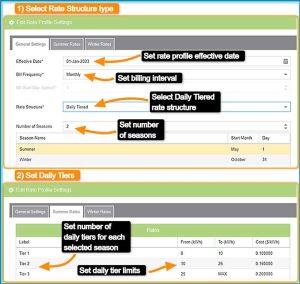
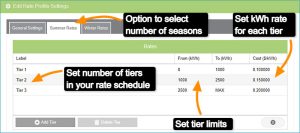
MyEyedro Tiered Rates

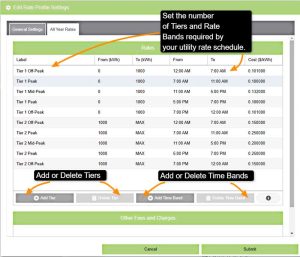
Set your tiered rates in the MyEyedro cloud interface. With MyEyedro you can add the rate bands that correspond to your electricity bill.

Read More »
Display Groups
Eyedro Tips
Eyedro Staff

Display Groups – Tips

Personalize your MyEyedro account with custom sensor groupings. Add any of your electricity sensors to a specific Display Group and give it a great name!

Read More »
MyEyedro Time of Use Rates
MyEyedro
Eyedro Staff

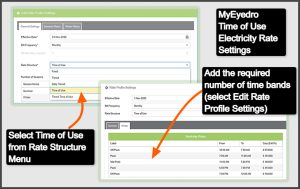
MyEyedro Time-of-Use Rates

Set your time-of-use rates in the MyEyedro cloud interface. With MyEyedro you can add the rate bands that correspond to your electricity bill.

Read More »
MyEyedro Rates Configuration
MyEyedro
Eyedro Staff

MyEyedro Rates Configuration

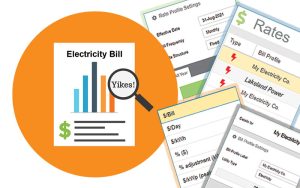
MyEyedro cloud software Rates configuration allows you to customize your MyEyedro account with your utility rates. Select from Fixed, Time-of-Use or Tiered options. Set fees such as tax, flat per bill fees and $/kWh. Create multiple Bill Profiles for different locations and assign them to Display Groups.

Read More »
Eyedro Sites
MyEyedro
Eyedro Staff

MyEyedro Sites Configuration

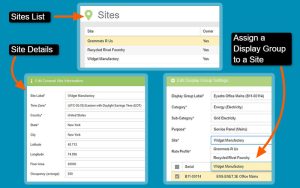
MyEyedro cloud software Sites configuration allows you to create Sites that correlate with a physical location or function. Display Groups can then be assigned to a specific Site. Site details include time zone, geographical coordinates and building details. Sites can be shared with another MyEyedro user via email.

Read More »
MyEyedro V5 Display Group Configuration
MyEyedro
Eyedro Staff

MyEyedro Display Group Configuration

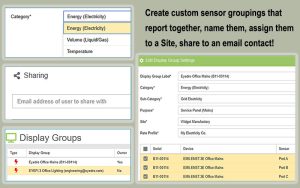
The MyEyedro cloud platform display group configuration allows you to assign your individual current sensors to groups that report together, e.g. mains, branch circuits or solar. You can also create a Display Group that contains all of your sensors, give the groups custom names and create email shares.

Read More »
MyEyedro cloud software version 5 device configuration.
Blog
Eyedro Staff

MyEyedro Device Configuration

The MyEyedro cloud platform device configuration allows you to claim your Eyedro devices to your account, assign personalized names to each device as well as adjust device parameters such as current multipliers, current direction for solar and net metering and also set device specific alerts.

Read More »