
Health Check
The health check dialog is provided as a means to validate the measurements are as expected and provide a list of warnings and/or errors detected. The health check is a combination of the validation and verification pages of the device setup wizard in one convenient dialog. Below are examples of when the Health check should be run:
- Device is moved to a new circuit.
- Device is powered from a different circuit.
- Device power supply is replaced
- Polarity (positive or negative) of measurements is not as expected.
- Polarity (positive or negative) is changing unexpectedly.
- Power Factor measurements are unexpectedly low.
NOTE: The Health Check is not available for all types of devices.
PRO TIP: If running health check on a device monitoring a net meter installation (i.e. solar or wind generation) – if possible, disconnect the generation to avoid having the device make incorrect decisions. Alternatively, run the health check during a period of very low generation (high consumption) where there is no electricity feeding back to the grid.
PRO TIP: If you have access to a large electrical load (i.e. range, dryer) – turn it on, if possible, during the health check and/or when re-running polarity detection. Try to avoid highly inductive loads (i.e. large motors or compressors).
Single-Phase Electricity Monitors
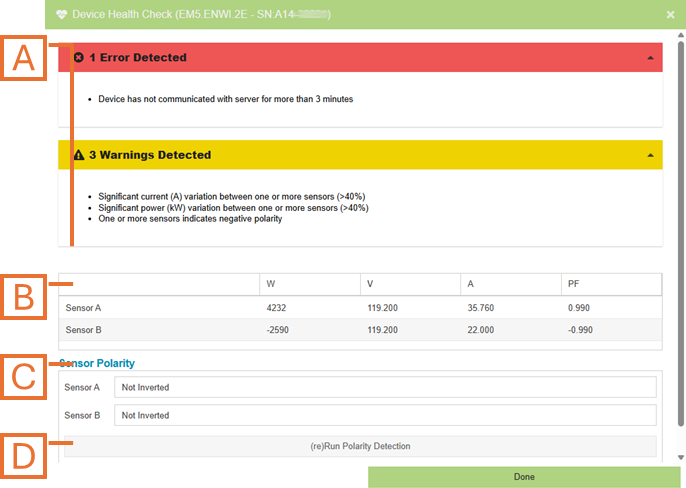
- Errors and Warnings. Provided to bring detected issues to your attention to either resolve or, in some cases, confirm it is as expected.
- Device Data panel. The most recent measurements reported by the device (updated every few seconds).
- Sensor Polarity panel. Displays the current Invert settings for each sensor port (Inverted or Not Inverted).
- (Re)Run Polarity Detection button. By clicking this button, the device will toggle the invert settings as required to make all measurements the same polarity (positive). NOTE: It may take several minutes from the time this button is clicked for the positive measurements to be reflected in the device data panel.
3-Phase Electricity Monitors
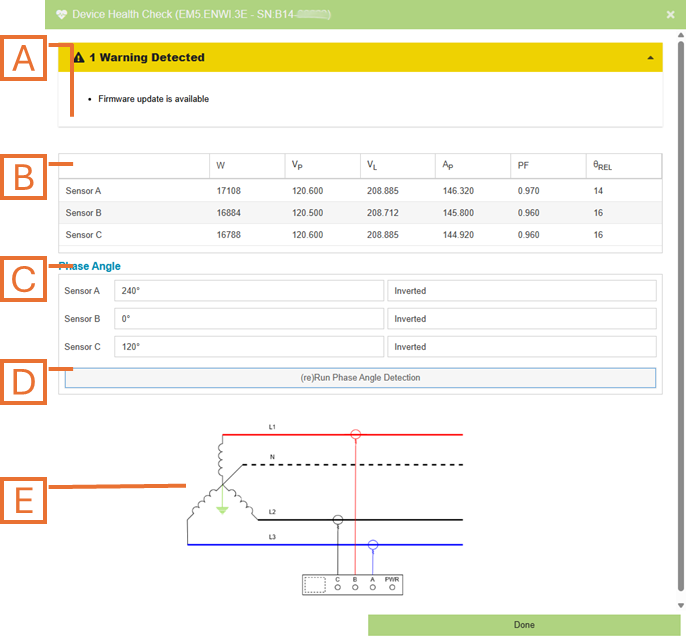
- Errors and Warnings. Provided to bring detected issues to your attention to either resolve or, in some cases, confirm it is as expected.
- Device Data panel. The most recent measurements reported by the device (updated every few seconds).
- Phase Angle panel. Displays the results from the last phase angle detection run.
- (Re)Run Phase Angle Detection button. This feature is used to determine the direction of each installed sensor as well as which of the three phases each sensor is connected to. NOTE: It may take several minutes from the time this button is clicked for the measurements to be reflected in the device data panel.
- Topology Diagram. The image shown will reflect the device configuration as well as the results of the phase angle detection algorithm.