
Hardware Installation | 3-Phase Energy Meter Product Guide
DO NOT CONTINUE WITH THE HARDWARE INSTALLATION OF THE EYEDRO ELECTRICITY MONITORING SYSTEM UNTIL YOU HAVE READ THE IMPORTANT SAFETY INFORMATION SECTION OF THIS GUIDE
Materials You Will Need
- Eyedro Electricity Monitor box contents
- Approved bushing or connector (not included)
- Labels (optional – not included)
- Two (2) #8 (4.2mm) pan head, round head or button head mounting screws (optional – not included)
- Tie wraps (optional – not included)
Tools You Will Need
- Screwdriver
- Flashlight
- Pliers
Install Current Sensors
Current sensors are installed on the individual line (live/hot) wires only. This must be done inside the electrical panel or junction box where the electrical connection is separated into the individual line, neutral and ground wires.
- Do not install sensors on neutral or ground wires.
- Do not install sensors on extension cords, appliance cords or sheathed cables.
- Do not install sensors on wires exceeding the max rating of the sensor.
CAUTION: Even with the main breaker in the ‘OFF’ position, the service entrance wires will still be electrified (before the breaker). Extreme caution should always be taken while working around electricity during hardware installation.
- Turn off the power by disengaging the main disconnect switch or turning off the main breaker.
- Carefully remove panel cover(s) to expose service entrance wires.
- Carefully remove a ‘knockout’ on the side of the panel and add an approved bushing or connector to protect the wires that will pass through it.
- Install one current sensor over each line conductor. Use the figures indicated in common circuit types as guidance.
- IMPORTANT: If installing over a single conductor of a parallel feed, ensure the ampacity of a single conductor (i.e., total ampacity / feeders) does not exceed the rating of the sensor.
- Optionally, use tape or other label to uniquely identify each sensor at the end of the wire nearest the connector (i.e., “Sensor 1”, “Phase A”, etc.).
- Route sensor cables through the bushing/connector so the plug ends are on the exterior of the panel.
- If provided (sold separately), install panel mount power supply or step-down transformer prior to replacing the panel cover(s) and route the low voltage side through the bushing/connector so the plug is on the exterior of the panel.
- IMPORTANT: Electricity monitoring devices must be powered by a circuit or receptacle that is downstream of the panel where the current sensors are installed
- Replace panel cover(s).
- Turn on the power.
Parallel Feeders
High ampacity services and feeders are often installed with conductors in parallel to reduce pulling tensions and for easier handling.
Parallel feeders are conductors of the same length, same material, same circular mil area, same insulation, and terminated in the same manner. In theory, the current flowing through each conductor will be the same and can be determined by the total ampacity divided by the number of feeder conductors i.e., 1600A / 4 conductors == 400A per conductor.
The most accurate way to measure would be with a single large sensor around all the parallel conductors. However, if you want to use a single smaller sensor to monitor you must ensure the following:
- The per conductor ampacity does not exceed the rating of the sensor.
- The system voltage does not exceed the rating of the sensor.
- The number of feeders is noted and set as the current multiplier during setup in the MyEyedro software.
PRO-TIP: If installing on a single conductor of a parallel feed, use a clamp-on meter to first verify that the current flowing through each of the feeders is equal. In theory, it should be but it isn’t always the case.
Common Circuit Types
The most common application of Eyedro Electricity Monitoring products is for monitoring of the electrical service entrance of a building. However, there are other common applications where Eyedro Electricity Monitoring products are often used. The following sub-sections provide a brief overview of some of the common and less common applications.
To use Eyedro Electricity Monitoring products in one of these applications, follow ALL instructions and precautions from the Service Entrance installation procedure but substitute step 4 to install the sensors on the line conductor of your desired circuit.
3-Phase Wye Monitoring

3-Phase Delta Monitoring

Note: The sensor position is the same for Delta, High-Leg Delta or Corner Grounded Delta systems.
Split (Single) Phase Monitoring

Single Phase Branch Circuit Monitoring
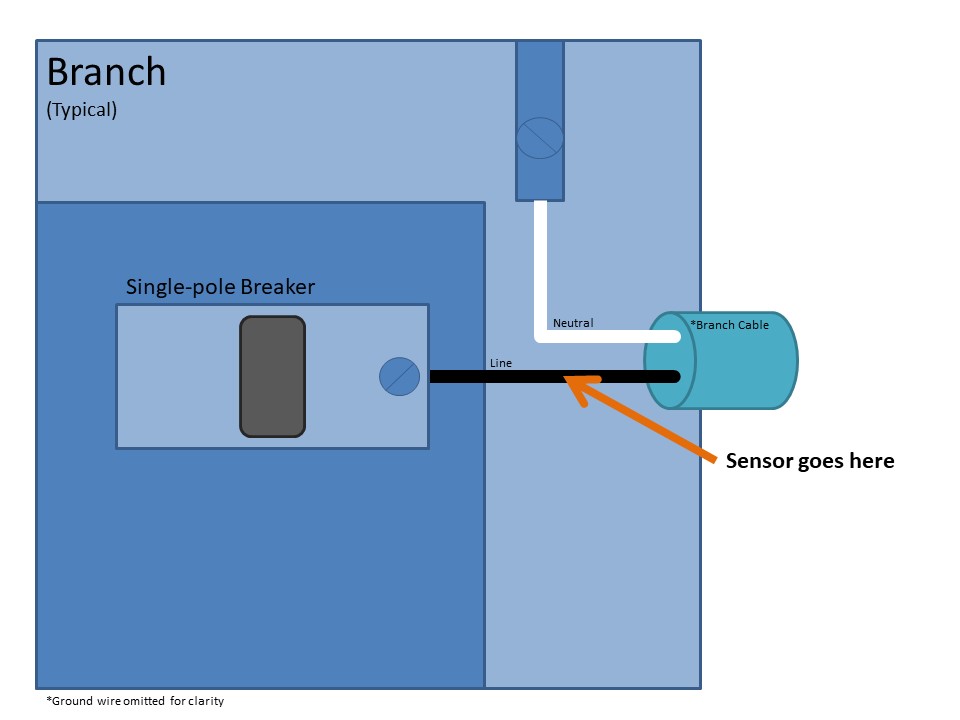
Branch circuits are typically used for lighting and receptacles throughout the building. These circuits can be identified by a single-pole breaker in the electrical panel. Cabling typically consists of black (line) and white (neutral) conductors with a bare copper (or green) ground conductor.
One (1) sensor is required for monitoring branch circuits. The sensor should be installed on the line wire of the circuit (typically black).
Balanced Branch Circuit Monitoring
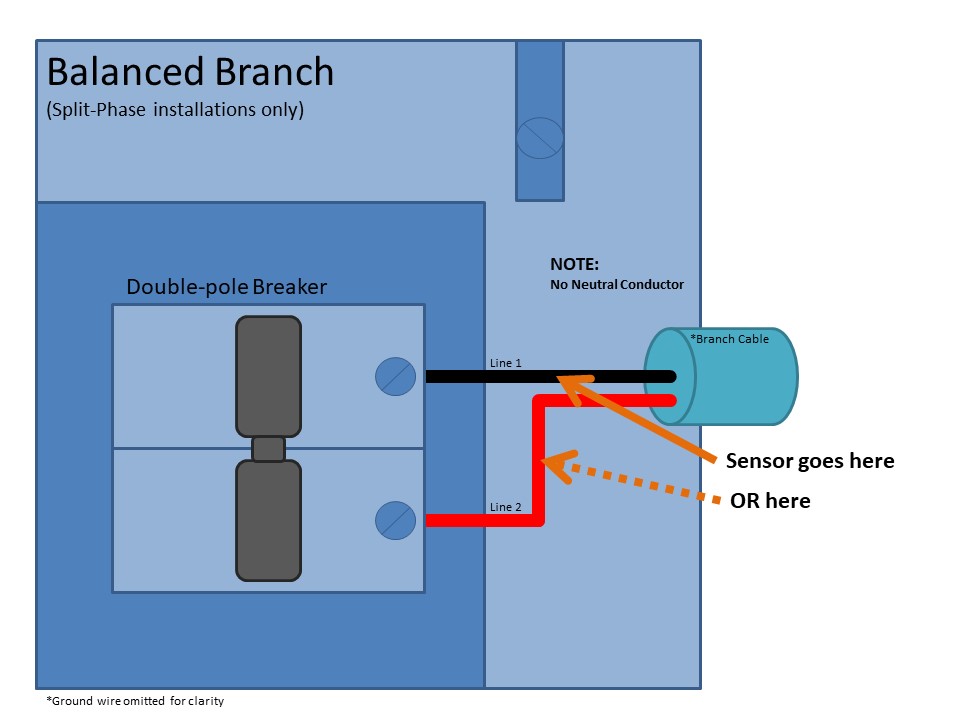
Balanced branch circuits are common in split-phase electrical services and typically used for large appliances throughout the building. Common examples of balanced loads are electric heaters/baseboards, electric water heaters, air conditioners, heat pumps, pool pumps, etc. These circuits can be identified by a double-pole breaker in the electrical panel. Cabling typically consists of black (line 1) and red (line 2) conductors with a bare copper (or green) ground conductor. Note: these circuits do not have white (neutral) conductors.
One (1) sensor is required for monitoring balanced branch circuits. The sensor should be installed on either line wire of the circuit (typically black or red).
Unbalanced Branch Circuit Monitoring
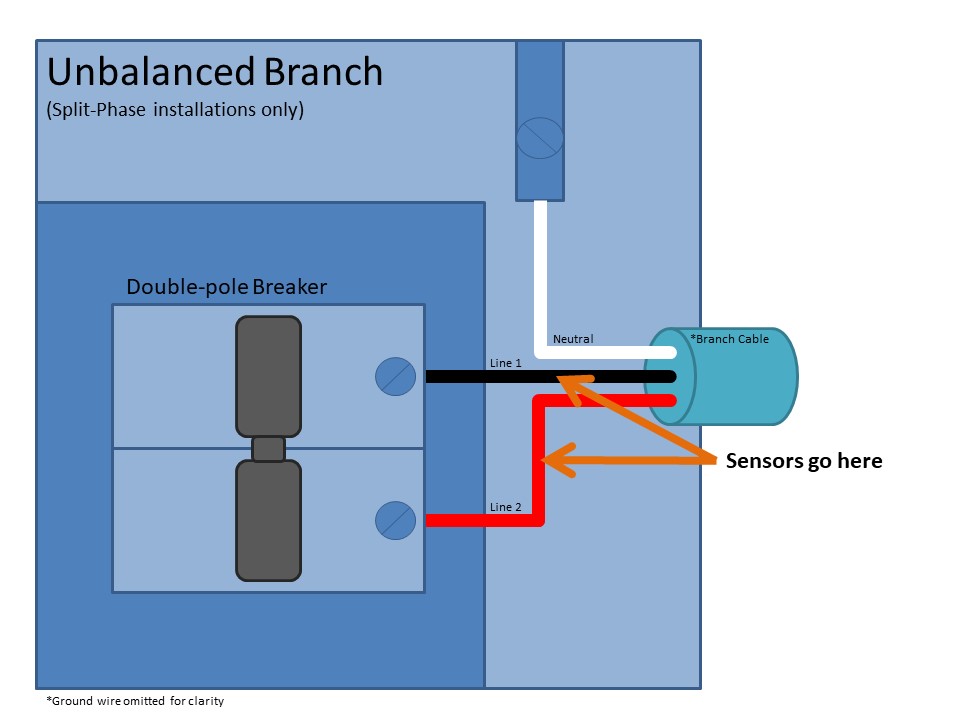
Unbalanced branch circuits are common in split-phase electrical services and typically used for large appliances, split receptacles, and sub-panel feeders throughout the building. A typical split-phase residential service entrance is also an example of a 240V unbalanced circuit. These are circuits with both 120V and 240V components. Common examples of 240V unbalanced loads are stoves, electric dryers, kitchen receptacles, sub-panels, etc. These circuits can be identified by a double-pole breaker in the electrical panel. Cabling typically consists of black (line 1), red (line 2), and white (neutral) conductors with a bare copper (or green) ground conductor.
Two (2) sensors are required for monitoring unbalanced circuits. The sensors should be installed on both line wires of the circuit (typically black and red).
Mount Eyedro Device
IMPORTANT: Do not mount the Eyedro device inside of an electrical panel. This is especially true for wireless (Wi-Fi or mesh) products, as the metal panel enclosure will drastically reduce the wireless signal quality which may affect the devices connectivity and ability to continuously collect data.
Vertical (wall) Mounting
- Write down the 8-digit serial number from the back of the module. This will be required during software setup.
- The serial number will be in the format “123 – 45678“
- PRO TIP: Record the serial number on the Quick Start Guide along with any other installation details.
- Find a clear area on the wall beside the electrical panel.
- Make sure all cables will easily reach the module before securing.
- Equipment shall not be mounted within 50.8 mm (2 in) in of any live parts including primary conductors, primary terminals, primary lugs. This requirement excludes insulated cables.
- Equipment attached to the enclosure shall not contact the panel interior insulation.
- Mounting provisions shall not be attached to any live part.
- Do not install equipment in any area where breaker arc venting exhaust gasses could be re-directed as a result of equipment installation.
- Mark locations on the wall for the screws using the module as a template.
- If preferred, drill a pilot hole in the marked locations using a 2.5 mm (7/64″) drill bit.
- Drive the two (2) pan head screws into the wall surface through the flange holes on the sides of the enclosure.
- Carefully tighten the screws until snug. Do not overtighten or it may cause damage to the flange(s).
- Ensure secure fit.
Horizontal (surface) Mounting
Mounting is not required for horizontal installations (i.e., on a desktop or shelf). If added security is desired, follow instructions for vertical mounting using screws or double-sided tape.
Connect Cabling
Important
- Ensure all connectors and sockets are free from damage prior to mating them.
- Ensure the retention clip on the Ethernet cable is intact.
- Never force connectors.
- Never apply levering action while connecting or disconnecting.
- Always grasp connectors by the strain relief while connecting or disconnecting.
- Ensure all connections are secure.
- Connect sensor cables to the Eyedro Energy Meter.
- For devices that will connect to the internet via Ethernet
- Connect one end of Ethernet cable to Eyedro Energy Meter.
- Connect the other end of the Ethernet cable to the Internet access point.
- Connect the appropriate end of the low-voltage power adapter to the Eyedro Energy Meter.
- Electricity Monitoring devices must use a power supply with a 6V AC output.
- Plug the other end of the low-voltage power adapter into a nearby AC wall receptacle.
- Devices should not be plugged into a UPS (Uninterruptible Power Supply) as they may result in inaccurate/incorrect measurements.
- IMPORTANT: Electricity monitoring devices (with sensors) must be powered by a receptacle that is downstream of the panel where the current sensors are installed.
- Optionally, secure all wiring neatly with tie wraps (not included).