
No power | Troubleshooting Guide
If you suspect your device has no power, follow these steps to troubleshoot:
Can you see the red and/or green status lights on the Eyedro module?
Look through the small opening on the cover of the Eyedro device to see the status lights.
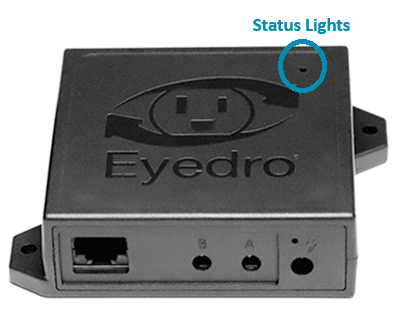
For all Electricity, Flow and Temperature monitoring products, the status lights can be seen by looking through the small opening in the top right corner of the device surface.
If the lights are flashing, the device has power. You can skip the remaining steps and proceed directly to Troubleshooting > No internet.
Are you using the power supply provided with your device?
It is important to match the power supply input (from the wall) and output (to the device) to the rating of the power supply and your Eyedro device. Failure to do so may result in the device not functioning, not functioning correctly and, in extreme cases, may cause damage to the device and/or power supply. Always use the power supply provided with your product.

All Eyedro electricity monitoring products utilize a wall mounted power adapter with a 6VAC 500mA output. The power supply shipped with the standard product is intended for a 120V 60Hz Type-A receptacle. Contact sales for alternate power supply options.
All Eyedro flow and temperature monitoring products utilize a wall mounted power adapter with a 5VDC 500mA output. The power supply shipped with the standard product is intended for a 120V 60Hz Type-A receptacle. Contact sales for alternate power supply options.
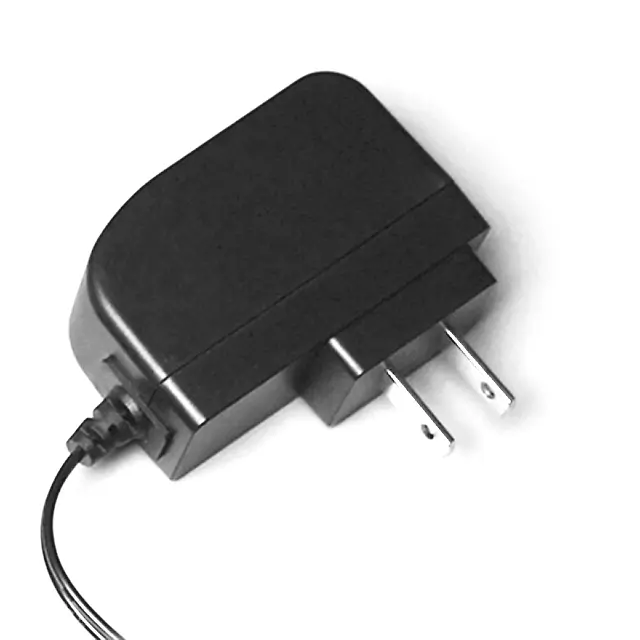
If for some reason it is not possible to use the power supply that came with your product:
- Contact sales for approved alternative power supply options for countries outside of North America
- Contact support with the details (and photos) of the power supply you are planning to use
Is everything securely connected?
Let’s double-check the connections — sometimes these cables wiggle loose on their own!
- Make sure the power adapter is firmly connected to the receptacle and nothing is in the way of it making a flush connection.
- Make sure the output of the power supply is securely connected to the power input of the Eyedro device.
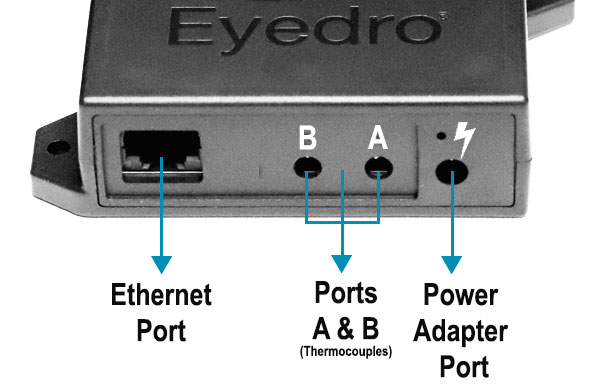
NOTE: The power input of the Eyedro device is the connector on the right side (when looking straight at it). It has a little lightning bolt molded into the enclosure.
Does the receptacle work?
Ensure the circuit breaker (or fuse) that your receptacle is on hasn’t been turned off or tripped. Also verify that the receptacle you are using isn’t controlled by a switch, timer or circuit interrupter that is off.
If using a power bar, make sure the power bar’s switch is in the “on” position and, if applicable, the fuse isn’t blown or tripped. Try bypassing the power bar and plug directly into the wall receptacle to see if it helps.
Try testing the Eyedro device, with power supply, in a different receptacle.
Do other devices or appliances work when plugged into the same receptacle?
Try plugging something else, like a lamp, into the same receptacle to see if it works.
If you have more than one Eyedro device, try using the power supply from a different Eyedro device – just make sure it has the same voltage rating.
If available, use a multimeter to measure:
- The voltage at the receptacle. You should see approximately 120V AC.
- The output of the power supply. Ensure the measured output matches the rating indicated on the serial label of your Eyedro device (6VAC or 5VDC). NOTE: When the power supply is unloaded (not connected to the Eyedro device), it will measure slightly higher than what is expected (e.g. a 6VAC supply will measure closer to 7VAC when unloaded).
PRO-TIP: When measuring with a multimeter, make sure your meter is using the correct setting; AC voltage setting for receptacle measurement, AC voltage setting for 6VAC power supplies and DC voltage setting for 5VDC power supplies.
PRO-TIP: When measuring the output of the power supply, you will likely need a small gauge wire that you can gently push inside the barrel connector opening. Do not force the meter probe directly into the end of the connector as it may cause damage.
More Help
If the above content doesn’t help you resolve your issue, contact support and one of our team members will help you resolve the issue and if necessary, handle any warranty requests..