
User Preferences | MyEyedro User Guide
The User Preferences plugin manages MyEyedro menu and navigation options, display preferences and user account information. Access the user preferences in MyEyedro here.
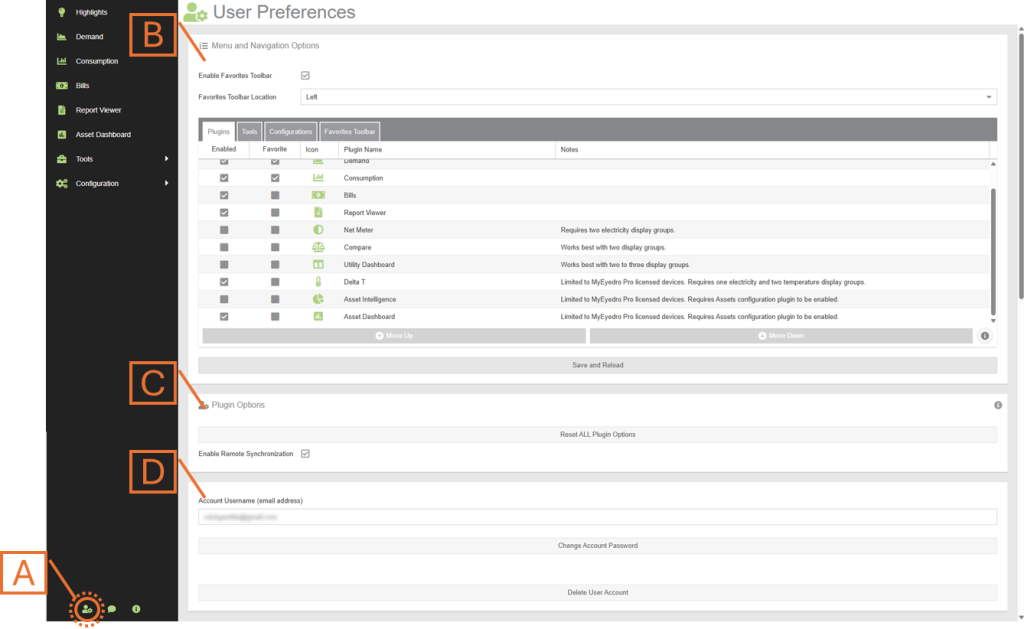
- Open the User Preferences by clicking on the User Preferences item found in the toolbar along the bottom of the plugin selection menu.
- Menu and Navigation Options panel. Manage the list of plugins available in the MyEyedro Plugin Selection Menu as well as enable and configure your Favorites toolbar.
- Plugin Options panel. Reset your plugin options and enable or disable remote storage of your options.
- Change your account password.